Extreme Picture Finder 3.15.0.1
Updated on 14 Feb 2012
By Anthony Buckner
By Anthony Buckner
Specifications
License:
Shareware (Free to try)
Updated:
Downloads:
2095
Platform:
Windows All
Publisher:
Extreme Internet Software(more)
Website:
User Reviews:
Other versions:
3.8, 3.7.3.0, 3.7.2.2
Do you like
Extreme Picture Finder?
FindMySoft Editor's Review
Extreme Picture Finder - Download multiple images or other media from a website fast and easy
Extreme Picture Finder can be invaluable if you need to download large amounts of pictures, audio or other multimedia from websites. The program saves you from the tedious process of saving multiple files one by one. It let's you download a whole web site worth of images, audio files and others.
It's not a large sized program. The package is almost 3 Mb in size and the installation process is fast. There's no additional stuff to be installed, like plugins or anything else.
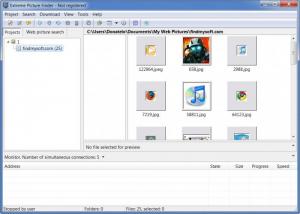
The interface is nothing to worry about. You only need a few minutes to look around and you'll have no problems. Most of the top menu items do the same things as the buttons. Downloading something from a web site requires clicking on a button from the toolbar. Hit the "new project", type in the name of the site and click "finish". It's as simple as that, but if you want, it can be more advanced. Clicking "new project" will bring up a wizard. The interesting thing is that it's not mandatory to go through all steps. You can click the "next" button a couple of times if you want more options or you can just click "finish" at any time. It's in this wizard that you can also select the type of files you want to download, so you might want to take a look at what's behind those "next" buttons. You can go for images, audio or video files, archives, flash, executables or web pages.
The results are displayed in the larger part of the window as thumbnails or you can choose other viewing modes, like list or details. Double clicking an image will open it instantly with the programs built in picture viewer which looks a lot like Windows' Photo Viewer. All results will already be downloaded to your PC so you'd better make sure you set your destination folder from the options menu if you don't want to go searching for them.
The program also features its own picture search engine. It works the same way as the main feature. Switching from the regular projects to web search requires clicking on the designated button on top of the projects list. It's like the web search and projects features are organized in tabs, but actually they are buttons. You can search the whole web for images, using your key words and other options you may find useful. The search results will be displayed the same way as the regular projects and they will also be downloaded automatically, but in small resolution. If you want one or more images in full size, select them, then click the "download full size image" button on the toolbar.
Pros:
Using Extreme Picture Finder is straight forward and there's no need for any advanced knowledge. Any beginner can handle it. The options it offers makes projects flexible and controllable. It also works really fast.
Cons:
There are no notable drawbacks to this program.
You'll never manually download media from web sites ever again. Extreme Picture Finder can take care of most media file types, so you don't have to go thorough the whole site and download them one at a time.
It's not a large sized program. The package is almost 3 Mb in size and the installation process is fast. There's no additional stuff to be installed, like plugins or anything else.
The interface is nothing to worry about. You only need a few minutes to look around and you'll have no problems. Most of the top menu items do the same things as the buttons. Downloading something from a web site requires clicking on a button from the toolbar. Hit the "new project", type in the name of the site and click "finish". It's as simple as that, but if you want, it can be more advanced. Clicking "new project" will bring up a wizard. The interesting thing is that it's not mandatory to go through all steps. You can click the "next" button a couple of times if you want more options or you can just click "finish" at any time. It's in this wizard that you can also select the type of files you want to download, so you might want to take a look at what's behind those "next" buttons. You can go for images, audio or video files, archives, flash, executables or web pages.
The results are displayed in the larger part of the window as thumbnails or you can choose other viewing modes, like list or details. Double clicking an image will open it instantly with the programs built in picture viewer which looks a lot like Windows' Photo Viewer. All results will already be downloaded to your PC so you'd better make sure you set your destination folder from the options menu if you don't want to go searching for them.
The program also features its own picture search engine. It works the same way as the main feature. Switching from the regular projects to web search requires clicking on the designated button on top of the projects list. It's like the web search and projects features are organized in tabs, but actually they are buttons. You can search the whole web for images, using your key words and other options you may find useful. The search results will be displayed the same way as the regular projects and they will also be downloaded automatically, but in small resolution. If you want one or more images in full size, select them, then click the "download full size image" button on the toolbar.
Pros:
Using Extreme Picture Finder is straight forward and there's no need for any advanced knowledge. Any beginner can handle it. The options it offers makes projects flexible and controllable. It also works really fast.
Cons:
There are no notable drawbacks to this program.
You'll never manually download media from web sites ever again. Extreme Picture Finder can take care of most media file types, so you don't have to go thorough the whole site and download them one at a time.
System Requirements
Microsoft Windows 98, ME, NT, 2000, XP, 2003, Vista, 7
Do you like Extreme Picture Finder
Quick Look VideoNew
Popular News
The free AboutOne app is currently exclusive to Windows Phone. The app is available for free in the Markeplace.
Google rolled out Chrome 19 to the Stable Channel. This version fixes some security problems and adds tab syncing capabilities.
Extreme Picture Finder Awards
Extreme Picture Finder Editor's Review Rating
Extreme Picture Finder has been reviewed by Frederick Barton on
14 Feb 2012. Based on the user interface, features and complexity, Findmysoft has rated
Extreme Picture Finder
4
out of 5 stars, naming it ExcellentYour Rating
Top Downloads
2.
Opera5.
Trillian8.
AIM9.
Skype10.
Ad-Aware12.
Nero13.
Google Earth14.
Picasa15.
Winamp16.
iTunes17.
RealPlayer18.
uTorrent19.
eMule20.
WinRAR21.
BitComet22.
WinZip23.
Shareaza24.
CCleaner25.
Recuva26.
Tweak UI27.
CuteFTP Home29.
Adobe Reader30.
NewsPiperBecome A Fan!
Link To Us!
Extreme Picture Finder
HTML Linking Code
HTML Linking Code
Latest Reviews